DNS stands for Domain Name System, and it’s a critical component of the internet’s functionality. It’s often likened to a phone book for the internet because it translates human-friendly domain names (like www⋆example⋆com) into machine-readable IP addresses (like 192⋆0⋆2⋆44), which are necessary for locating devices and services on the internet.
〽️Domain Hierarchy:
The structure of domain names is hierarchical and includes several levels:
1. Top-Level Domain (TLD): The highest level of the hierarchy, TLDs are the suffixes like .com, .org, or .net. They are further categorized into:
A. Generic top level domains (gTLDs): These are not tied to any specific country, such as .info or .app.
B. Country code top level domains (ccTLDs): These are specific to individual countries, like .uk for the United Kingdom or .jp for Japan.
2. Second-Level Domain (SLD): This is the unique part of the domain name that you register, like example in www⋆example⋆com.
3. Subdomains: These are divisions of the SLD, used to organize different sections of a website, like blog in blog⋆example⋆com.
🗂️DNS Records:
DNS records are stored in DNS servers and define how the DNS responds to queries. Common types include:
1. A Record: Maps a domain name to an IPv4 address.
2. AAAA Record: Maps a domain name to an IPv6 address.
3. CNAME Record: Points one domain name to another, allowing for domain aliases.
4. MX Record: Specifies the mail server responsible for receiving email messages on behalf of a domain.
🔨How DNS Works
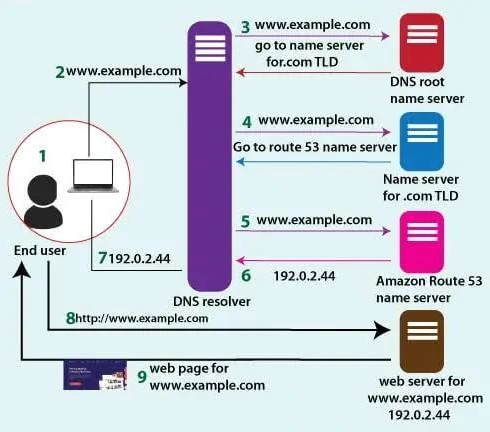
The process of DNS resolution involves several steps:
1. DNS Query: When you type a domain name into your browser, it sends a query to a DNS server to find the corresponding IP address.
2. Recursive Resolver: Your query first reaches a recursive resolver, which acts like a librarian searching for the book you’ve requested.
3. Root Nameserver: If the resolver doesn’t have the information, it asks a root nameserver, which directs it to a more specific location.
4. TLD Nameserver: The resolver then goes to the TLD nameserver, which holds information for the domain’s TLD.
5. Authoritative Nameserver: Finally, the resolver reaches the authoritative nameserver, which has the exact IP address for the domain.
6. The resolver then returns the IP address to your browser, which can then connect to the web server hosting the website you want to visit.
DNS is a foundational technology that makes the internet user-friendly by allowing us to use memorable domain names instead of numerical IP addresses. It’s a distributed and robust system that ensures the accessibility and efficiency of internet resources worldwide.
I hope you find this post useful and informative. Please feel free to share your thoughts and feedback in the comments. Stay tuned for more posts on cybersecurity, risk and compliance in the coming days.