In the context of computer networking, ports are virtual points where network connections start and end. Ports are associated with IP addresses to uniquely identify connections on a network. When discussing “secure” and “insecure” ports, we’re typically referring to the practices or protocols associated with those ports, rather than the ports themselves being inherently secure or insecure.
Insecure Ports and Protocols
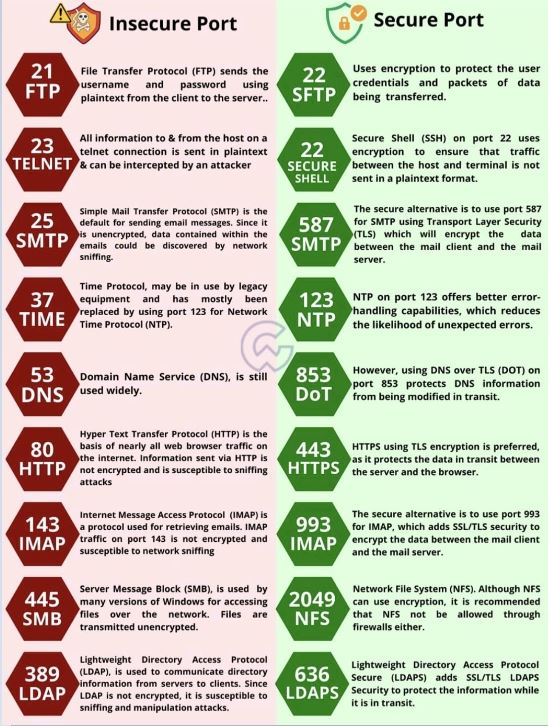
“Insecure” ports are those that are typically associated with older, unencrypted, or less secure protocols. Data transmitted via these ports can be easily intercepted and read by unauthorized parties. Common examples include:
- HTTP (Port 80): Used for unencrypted web traffic. Data sent over HTTP is not secure and can be intercepted.
- FTP (Ports 20 and 21): Used for File Transfer Protocol for transferring files. FTP does not encrypt its traffic.
- Telnet (Port 23): Used for remote command-line access to devices. Telnet sends data, including login credentials, in plain text.
- SMTP (Port 25): Used for sending emails. Without encryption layers, emails sent over SMTP can be intercepted.
- POP3 (Port 110) and IMAP (Port 143): Used for retrieving emails. Unencrypted variants of these protocols can expose email contents.
Secure Ports and Protocols
“Secure” ports are associated with encrypted and more secure protocols. These protocols provide security features like data encryption, integrity, and sometimes authentication. Examples include:
- HTTPS (Port 443): The secure version of HTTP, used for encrypted web traffic. It uses SSL/TLS encryption.
- FTPS (Ports 989 and 990) and SFTP (Port 22): Secure versions of FTP. FTPS uses SSL/TLS encryption, and SFTP (SSH File Transfer Protocol) uses SSH encryption.
- SSH (Port 22): Used for secure remote access, replacing Telnet. It encrypts the session to prevent eavesdropping.
- SMTPS (Port 465) or SMTP with STARTTLS (Port 587): Secure email sending protocols. They use SSL/TLS to encrypt the email data.
- IMAPS (Port 993) and POP3S (Port 995): Secure versions of IMAP and POP3, respectively, using SSL/TLS encryption for email retrieval.
General Practices
- Default Ports: While these ports are the defaults for these protocols, they can be changed. For example, a service might run HTTP on a different port for various reasons.
- Firewall Configuration: Firewalls are often configured to block certain insecure ports or to restrict access to only trusted sources for both secure and insecure ports.
- Transition to Security: There’s a general trend in network administration to move services from insecure to secure ports/protocols. For example, replacing HTTP with HTTPS and FTP with SFTP or FTPS.
Important Notes
- Port Number Alone is Not a Security Measure: Just because a service runs on a “secure” port doesn’t mean the service itself is secure. Proper configuration, use of strong encryption methods, and following best practices are essential for actual security.
- Security is Multifaceted: Port and protocol security is just one aspect of network security. Comprehensive security strategies consider various other factors, including system hardening, user authentication, network segmentation, and regular vulnerability assessments.